
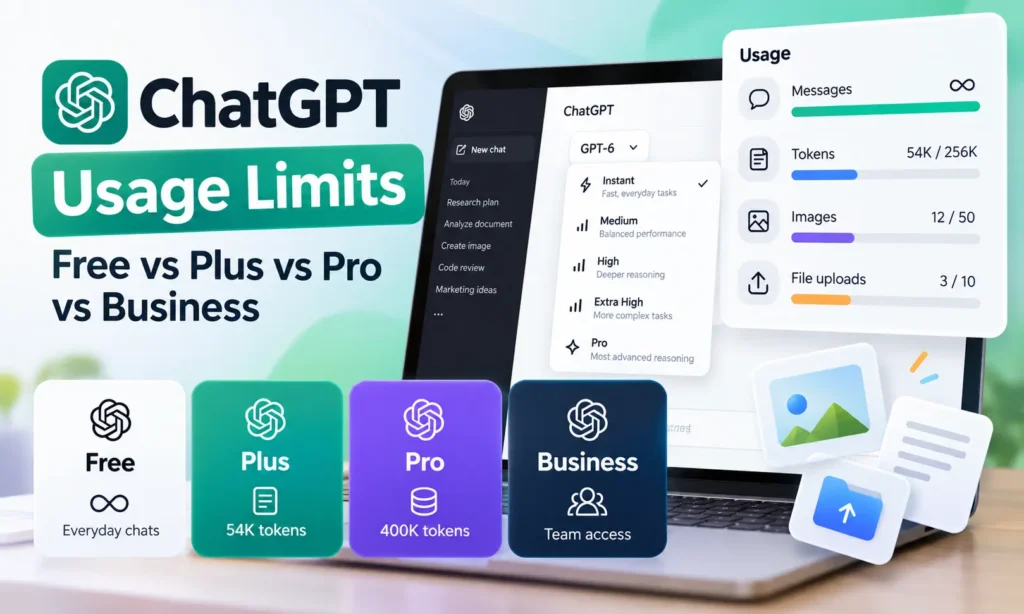

ChatGPT usage limits depend on more than how many messages you send. Your subscription determines which models you can access, how much text you can process, and what happens when you reach a limit for reasoning, images, uploads, or other tools.
OpenAI currently offers unlimited everyday text conversations across its main plans, subject to safeguards. However, this does not mean unlimited GPT Pro messages, image generation, file uploads, or advanced reasoning.
For example, ChatGPT Plus provides a 54K-token Instant context window and a 256K-token Reasoning context window. Pro expands these to 128K and 400K tokens, respectively. The maximum amount of user input is smaller than the total context window.
This guide compares ChatGPT Free, Plus, Pro, and Business usage limits, including message allowances, tokens, input size, image generation, reset windows, and plan-specific restrictions.
Key Takeaways
- Everyday chats OpenAI advertises unlimited ordinary text conversations, subject to reasonable-use and abuse-prevention safeguards. Advanced models and tools have separate limits.
- ChatGPT Free Has a published 27K-token Instant context window and limited access to uploads, image generation, and advanced features.
- ChatGPT Plus Offers a 54K-token Instant context window and 256K-token Reasoning context window, along with expanded model and tool access.
- ChatGPT Pro Increases those context windows to 128K and 400K tokens. Pro-model messages still have separate usage limits.
- ChatGPT Business Provides team workspaces, with Pro-model allowances that differ between Standard and Premium seats.
- Reset windows There is no universal hourly or daily reset. Depending on the feature, allowances may reset after several hours, weekly, or monthly.
ChatGPT Free vs Plus vs Pro vs Business: Usage Limits Compared
The main differences are the available reasoning levels, context capacity, input size, and access to advanced tools.
| Feature | Free | Plus | Pro | Business |
|---|---|---|---|---|
| Everyday text chats | Unlimited* | Unlimited* | Unlimited* | Included* |
| GPT-6 Medium and High | No | Yes | Yes | Yes |
| GPT-6 Extra High | No | No | Yes | Yes |
| GPT-6 Pro | No | No | Yes | Yes |
| GPT Instant context window | 27K | 54K | 128K | Depends on workspace and model |
| GPT Reasoning context window | Varies | 256K | 400K | Depends on workspace and model |
| Instant input maximum | ~12 pages | ~40 pages | ~250 pages | Workspace/model-dependent |
| Reasoning input maximum | Varies | ~320 pages | ~680 pages | Workspace/model-dependent |
| Image generation | Limited | Expanded | Unlimited with safeguards | Available, with applicable limits |
| File uploads | Limited | Expanded | Higher allowances | Workspace-dependent |
| Pro-model message limits | Not available | Not available | Tier-dependent | Seat-dependent |
| Team administration | No | No | No | Yes |
Source: OpenAI ChatGPT Pricing, Everyday text access is subject to applicable safeguards. Figures represent published plan capabilities, not guaranteed processing capacity for every request. GPT-6 availability may vary during rollout.
OpenAI’s model selection separates Instant from higher reasoning levels. Instant is intended for faster everyday responses, while Medium, High, and Extra High provide progressively more intensive reasoning where available.
Importantly, the Pro reasoning mode is not the same as the regular Pro subscription. A Pro subscriber can use several reasoning options, but GPT-6 Pro has its own message allowance.
ChatGPT Token Limits: What Is the Maximum Context Window?
A token is a unit of text that an AI model processes. Depending on the language and content, one word may contain one or several tokens.
ChatGPT uses tokens to process your prompt, relevant conversation history, instructions, and its response.
The context window is the total amount of information the model can consider within its available processing context. It is not the same as the number of words you can paste into a single message.
GPT Instant vs Reasoning Token Limits
| Plan | GPT Instant total context | GPT Reasoning total context |
|---|---|---|
| Free | 27,000 tokens | Varies |
| Plus | 54,000 tokens | 256,000 tokens |
| Pro | 128,000 tokens | 400,000 tokens |
| Business | Model and workspace-dependent | Model and workspace-dependent |
These figures are especially relevant for users working with lengthy documents, research reports, software repositories, and extended conversations.
For example, someone on Plus may choose a Reasoning mode to work with more context than the 54K-token Instant window allows. Pro provides a larger published context window for both categories.
However, a 400K-token context window does not mean users can paste 400K tokens into one prompt. The system also needs space for instructions, conversation history, tool information, internal processing, and output generation.
What happens when a conversation exceeds its context window?
ChatGPT manages conversation context automatically. In longer conversations, earlier details may not remain available in full to the active model.
This can cause the model to overlook an earlier instruction or require you to repeat important information. A larger context window reduces some of these constraints but does not guarantee perfect recall.
For complex projects, keeping critical requirements in a concise reference document can be more reliable than depending on a very long chat history.
ChatGPT Input Limits: Instant vs Reasoning
OpenAI also publishes approximate maximum input sizes expressed as pages of text.
These figures help explain how much material a user might be able to provide, but they are not fixed file-upload allowances.
| Plan | GPT Instant input maximum | GPT Reasoning input maximum |
|---|---|---|
| Free | Approximately 12 pages | Varies |
| Plus | Approximately 40 pages | Approximately 320 pages |
| Pro | Approximately 250 pages | Approximately 680 pages |
| Business | Depends on enabled model and workspace | Depends on enabled model and workspace |
The page estimates are approximate. Formatting, existing conversation history, tools, memory, and other context requirements can change the available space.
For instance, a 200-page research document may exceed the estimated direct Instant input capacity on Plus but fit within its published Reasoning input estimate, depending on how the text is processed.
Uploading a document is different from pasting its entire contents into the prompt. ChatGPT may process or retrieve sections of an uploaded file instead of placing the complete document in the active context.
The practical distinction: Context window size, maximum input size, and file-upload limits are three different restrictions. A plan with a larger context window does not automatically allow unlimited uploads.
ChatGPT Message and Hourly Usage Limits
ChatGPT does not publish one hourly message cap that applies to every plan and model.
Ordinary text conversations are advertised as unlimited, subject to safeguards. More resource-intensive models, advanced reasoning, and individual tools can have their own usage allowances.
| Usage type | How limits work |
|---|---|
| Everyday Instant chats | Unlimited under applicable safeguards |
| Medium and High reasoning | Plan-specific allowances and available fallbacks |
| Extra High reasoning | Available on eligible higher-tier plans |
| GPT-6 Pro | Separate message allowance |
| Image generation | Separate feature limits |
| File uploads and data analysis | Separate tool allowances |
| Work and Codex | Included usage with applicable time windows |
Does ChatGPT have an hourly message limit?
There is no limit such as 50 or 100 messages per hour across all subscriptions. Certain features use shorter usage windows, while others have weekly or monthly allowances. Reaching a shorter-window limit may temporarily restrict a specific model even when other models remain available.
For example, ChatGPT Work and Codex can have a five-hour usage window alongside a weekly allowance. That is not equivalent to a fixed hourly limit for ordinary ChatGPT conversations.
Users should check the applicable model’s usage notice rather than assuming that every restriction resets at the top of the hour.
ChatGPT Plus Usage Limits: What Do You Actually Get?
ChatGPT Plus offers expanded access to advanced reasoning, image generation, file uploads, data analysis, and other tools compared with Free. For regular Chat, Plus includes GPT-6 Medium and High where available. Extra High and GPT-6 Pro are reserved for eligible higher-tier subscriptions.
Its published context allowances are:
- GPT Instant: 54K total tokens.
- GPT Reasoning: 256K total tokens.
- Instant user input: approximately 40 pages.
- Reasoning user input: approximately 320 pages.
Plus does not provide unrestricted access to every advanced feature. Tool-specific limits can still apply, and some usage allowances may change as OpenAI updates models or service capacity.
For someone primarily using ChatGPT for writing, research, document analysis, and moderately complex reasoning, Plus may provide enough capacity without requiring a Pro subscription.
If you’re evaluating the subscription’s overall value rather than its technical restrictions, see our guide on whether ChatGPT Plus is worth it.
ChatGPT Pro Usage Limits: Pro 100 vs Pro 200 vs Pro 500
ChatGPT Pro offers higher usage allowances and access to GPT-6 Pro, which is designed for more demanding reasoning tasks.
OpenAI currently offers three Pro subscription levels.
| Plan | Monthly price (USD) | Main difference |
|---|---|---|
| Pro 100 | $100 | Entry-level Pro-model allowance |
| Pro 200 | $200 | Higher included usage |
| Pro 500 | $500 | Highest included usage and eligible Ultrafast modes |
These tiers are not equivalent to purchasing a fixed number of unlimited messages. Model-specific allowances still apply.
GPT-6 Pro message limits
OpenAI documents a shared weekly allowance of 50 messages across GPT-6 Pro and GPT-5.6 Sol Pro for Pro 100.
Pro 200 has higher allowances, but the exact entitlement can depend on when the subscription started and whether it qualifies for grandfathered usage. OpenAI has changed the allowances for newly purchased Pro 200 subscriptions.
Pro 500 provides the highest included usage among the Pro tiers, but users should consult the current subscription details for the applicable Pro-model allowance.
A higher Pro tier can be worthwhile for users who regularly exhaust intensive reasoning or Work and Codex allowances. It is unlikely to offer the same value to someone whose activity consists mainly of ordinary text conversations.
ChatGPT Business Limits: Standard vs Premium
ChatGPT Business is intended for organizations that need shared workspaces, administrative controls, and centrally managed access.
Business includes Standard and Premium seat types, with different included allowances for certain advanced capabilities.
GPT-6 Pro limits on Business
| Business seat | Included Pro-model messages |
|---|---|
| Standard | 15 per month |
| Premium | 50 per week |
These allowances are shared across GPT-6 Pro and GPT-5.6 Sol Pro. Switching between the models does not reset the included allowance.
Business Premium also includes greater Work and Codex usage than Standard, but that does not mean every ChatGPT feature has five times the allowance.
Workspace administrators may control model availability, and eligible organizations can purchase additional usage credits subject to workspace settings and spending controls.
A Business subscription therefore offers more than message capacity. Its main differentiators include team administration, managed access, and organizational workflows.
ChatGPT Image Generation Limits: Free vs Plus vs Pro vs Business
Image generation has separate allowances from everyday text conversations.
| Plan | Image generation access | Fixed daily image count |
|---|---|---|
| Free | Limited | No universal public count |
| Plus | Expanded | No universal public count |
| Pro | Unlimited under applicable safeguards | No fixed universal daily cap advertised |
| Business | Available, with applicable workspace limits | Depends on plan and settings |
OpenAI advertises unlimited and faster image creation on Pro, subject to abuse-prevention safeguards. This does not mean every request is guaranteed to complete instantly or that other tool limits disappear.
Free users have a lower image-generation allowance, while Plus offers expanded access. OpenAI does not provide a universal daily number that reliably applies to every account.
Do image uploads count toward image generation limits?
Not necessarily. Uploading an existing image for analysis and generating a new image are different operations. Image uploads can be subject to upload and vision limits, while image generation has its own feature restrictions.
For example, a user may temporarily exhaust their image-creation allowance while still being able to discuss an image they have already uploaded.
ChatGPT File Upload and Data Analysis Limits
File uploads and data analysis are available across multiple ChatGPT subscriptions, but included access varies. Free users receive limited allowances. Plus provides expanded access, while Pro and Business support more demanding workflows under their applicable plan and workspace rules. The number of files you can upload is not the same as how much text the model can consider at once.
For example, a large PDF may be accepted as an uploaded file while only relevant sections are retrieved or processed during a particular response.
Practical restrictions can include file size, upload frequency, storage or workspace policies, and the type of processing requested.
Users working with very large datasets should distinguish between the model’s context window and the separate data-analysis environment used to inspect files.
When Do ChatGPT Usage Limits Reset?
ChatGPT usage limits do not all reset at midnight. The reset schedule depends on the model, feature, account, and type of allowance.
| Limit | Typical reset structure |
|---|---|
| Short-window allowances | Reset after the applicable usage period |
| Weekly model allowances | Reset according to the model’s weekly schedule |
| Monthly allowances | Reset according to the applicable monthly period |
| Image and upload limits | Feature-specific reset rules |
| Work and Codex | Can include five-hour and weekly limits |
Some allowances operate simultaneously. A user may still have weekly usage remaining but reach a shorter-window restriction.
How to check your remaining usage
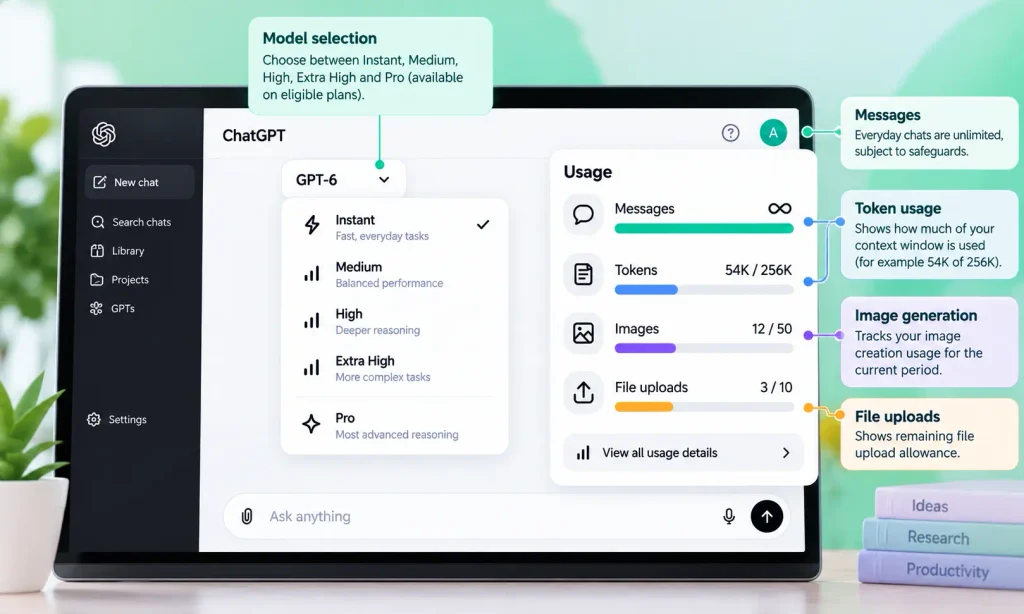
Open ChatGPT and inspect the model picker, usage notifications, or relevant account settings. Where OpenAI provides reset information, ChatGPT displays when the selected allowance becomes available again.
For Work and Codex, the usage screen under Settings can provide additional information about available usage and reset windows. Not every feature exposes a precise remaining-message counter.
What happens after you reach a usage limit?
ChatGPT may temporarily disable the affected model or tool, display a reset time, or continue using another available model. Reaching a GPT-6 Pro limit does not automatically prevent everyday ChatGPT conversations.
Similarly, exhausting an image-generation allowance does not necessarily block normal text chat. Starting a new conversation does not independently reset account-level message allowances.
Which ChatGPT Plan Should You Choose?
The most appropriate subscription depends on which restriction affects your work.
| Main requirement | Suggested starting plan | Reason |
|---|---|---|
| Everyday questions and writing | Free | Unlimited everyday text access |
| Regular research and document analysis | Plus | Expanded reasoning, context and tools |
| Long documents and intensive reasoning | Pro | Larger context and higher allowances |
| Frequent Pro-model usage | Appropriate Pro tier | Higher included Pro usage |
| Team collaboration and administration | Business | Managed workspace and user controls |
| Heavy coding and delegated tasks | Compare Pro and Business allowances | Work and Codex consumption differs from ordinary Chat |
For most individuals, Plus is the natural starting point when Free becomes restrictive. Pro becomes more relevant when advanced model access, context capacity, or intensive workloads justify the additional cost.
Business is best evaluated as a workspace and organizational subscription, not merely as a cheaper alternative to personal Pro access.
How We Evaluated ChatGPT Usage Limits
This guide uses OpenAI’s official pricing, model-access, and usage-limit documentation. We separated context windows from input limits and regular Chat allowances from image, upload, Work, and Codex usage. We did not independently exhaust every subscription’s allowance through controlled testing. Actual limits may change with account eligibility, model updates, and workspace settings.
