



The best text to speech app is not necessarily the one with the longest feature list. Start with what you read, where you read it and what you are willing to pay.
A natural voice can make a good first impression. It cannot tell you how well a text to speech app will handle the research paper on your desk, the novel in your Kindle library or the article you saved for your commute. Getting the content into the app, finding your place and listening without a connection can matter just as much as the voice itself.
CastReader, Speechify, NaturalReader and ElevenReader all help people listen to written content, but they approach that task differently. This comparison covers their personal reading products, not commercial voiceover studios or developer APIs. It draws on published features and pricing rather than presenting an untested ranking of voice quality.
A Quick Way to Narrow the Field
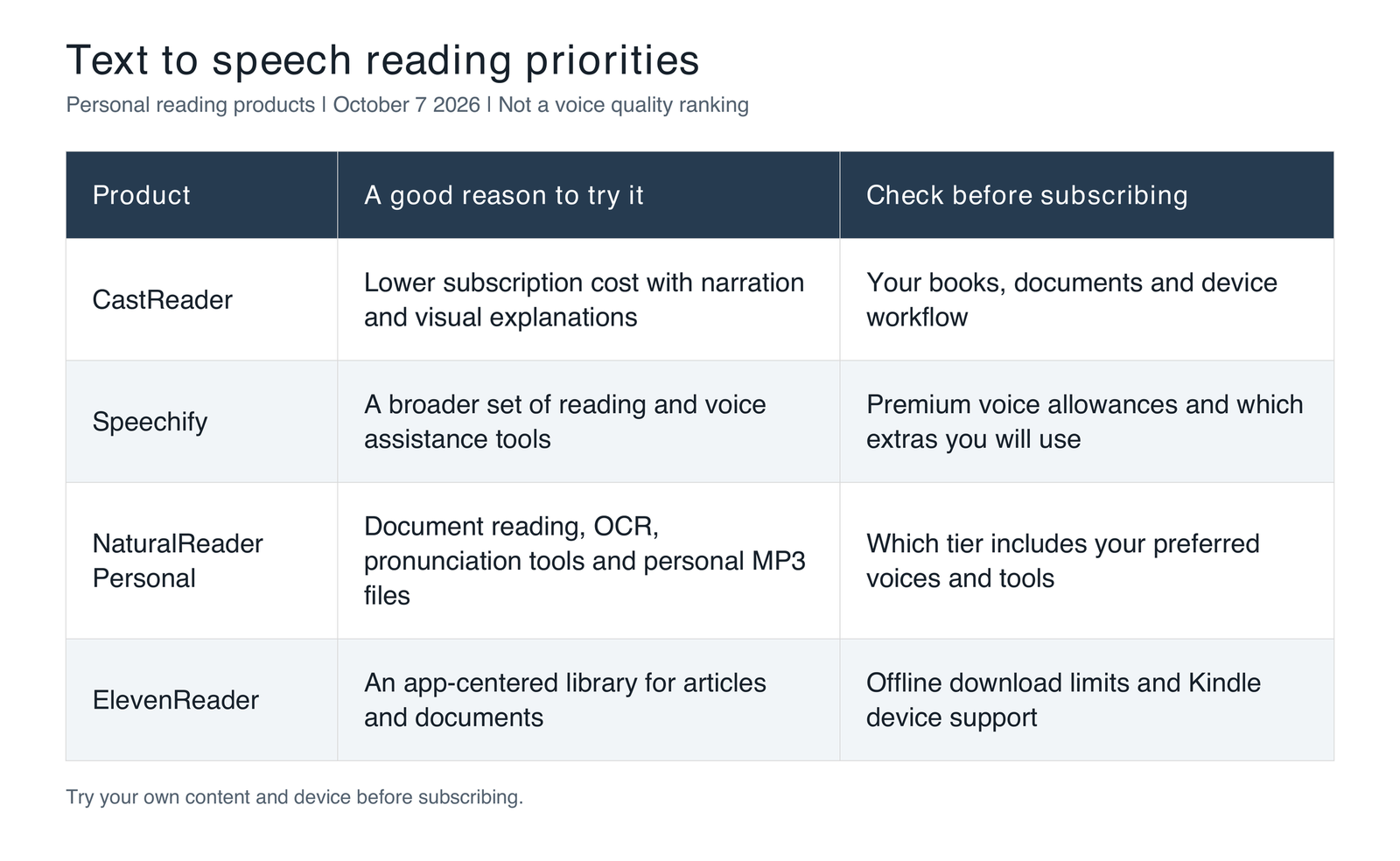
Use these distinctions to decide which product to test first. This is a starting point, not a universal ranking. Features and prices can change, and regional or app store checkout prices may differ from the web subscriptions below.
CastReader keeps the subscription cost in focus
CastReader Pro costs $35.99 a year or $4.99 a month on its website. That is the lowest annual price among the paid reading plans compared here. It is not a claim that CastReader is the cheapest TTS product on the market, or that these subscriptions provide identical benefits.
The appeal goes beyond price. CastReader offers read aloud workflows for supported webpages and documents, plus Kindle reading through its mobile apps and desktop browser extension. Its mobile Kindle workflow covers iPhone, iPad, Android phones and Android tablets. For someone who reads across articles, reports and books, that range is a practical reason to try it.
AI Explain adds spoken explanations with captions, highlighting and handwritten-style annotations tied to the source material. That makes it worth exploring when you want an overview before deciding which passages deserve a closer read. Full-text narration serves a different purpose by preserving the original sequence and detail.
Voice cloning is an optional personal touch, not a prerequisite for reading. Pro includes 120 minutes of cloned audio generation per membership month; that allowance should not be confused with ordinary voice usage. You can start with the CastReader apps and browser extensions for the device you use most.
The caveat is that these are different entry points. The mobile bookshelf, desktop extension and short text web tool are not interchangeable interfaces. Check your actual document, book and offline requirements before assuming a feature works identically everywhere.
Speechify offers a broader voice toolkit
Speechify combines reading with a wider set of voice-based tools. Its consumer products have browser, mobile and desktop entry points, with support for content such as webpages, documents and scanned text. Premium also includes AI summaries and chat, AI Podcasts and voice assistant features.
That breadth can be useful if reading is only one part of the job. Someone who wants to listen to a document and then ask questions about it may value having both activities in a familiar tool. Speechify also lists personal voice cloning on its Android product page, so cloning alone does not distinguish CastReader from it.
The question is whether you will use enough of the toolkit to justify the price. The published reading Premium subscription costs $29 monthly or $139 annually, and premium voices have usage rules. For listening to a few articles, the additional tools may be unnecessary. For frequent users of several voice features, they deserve consideration as part of the same budget.
NaturalReader puts document tools front and center
NaturalReader Personal is particularly worth investigating if much of your reading arrives as files. Paid plans include OCR, pronunciation editing, content filtering and MP3 conversion for personal use. Those are concrete benefits when your material contains scanned pages, specialized vocabulary or sections you would prefer not to hear repeatedly.
Its ReadAI features also extend beyond narration, with document chat, overviews, podcasts and quizzes. The dedicated ReadAI guidance focuses on documents uploaded on the web. Check the relevant platform before assuming every option is available in the mobile app.
The subscription tiers need careful attention. Lite costs $79 annually, Plus $119 and Pro $159, with monthly options of $13.90, $20.90 and $25.90 respectively. Plus and Pro include voice cloning; Lite does not. Voice categories and audio conversion have their own allowances, so work backward from the voice and export features you actually need.
NaturalReader is a sensible candidate for papers, training materials and scanned documents. However, support for ebook files is not the same as direct access to every purchased Kindle book. Importing an eligible personal file and connecting to a protected reading service are different workflows.
ElevenReader builds around a listening library
ElevenReader accepts files, links and pasted text and provides highlighting as you follow along. Its Chrome extension primarily sends content to ElevenReader. That suits readers who like collecting material in one app to hear later. If you prefer staying on the original webpage, consider whether the extra import step fits your habits.
Its AI options include GenFM audio overviews and a Voice Chat beta that can refer to the content being read. Ultra also offers Voice Design, which creates a voice from a text description. That should not be treated as the same process as cloning a real person’s recorded voice.
The free plan provides 10 listening hours a month. Ultra costs $11 monthly or $99 annually. Offline listening is an important consideration, but the download allowance is not unlimited: the official help page specifies 10 downloads per month, each up to eight hours long. Listening to imported text and accessing commercial audiobooks also involve different entitlements.
ElevenReader now has an official Kindle workflow too. Its Kindle FAQ currently specifies iPhone and iPad, with Android still to come. Check your device and a book you can access rather than relying on an older article that simply says Kindle is supported or unsupported.
What the reading subscriptions cost
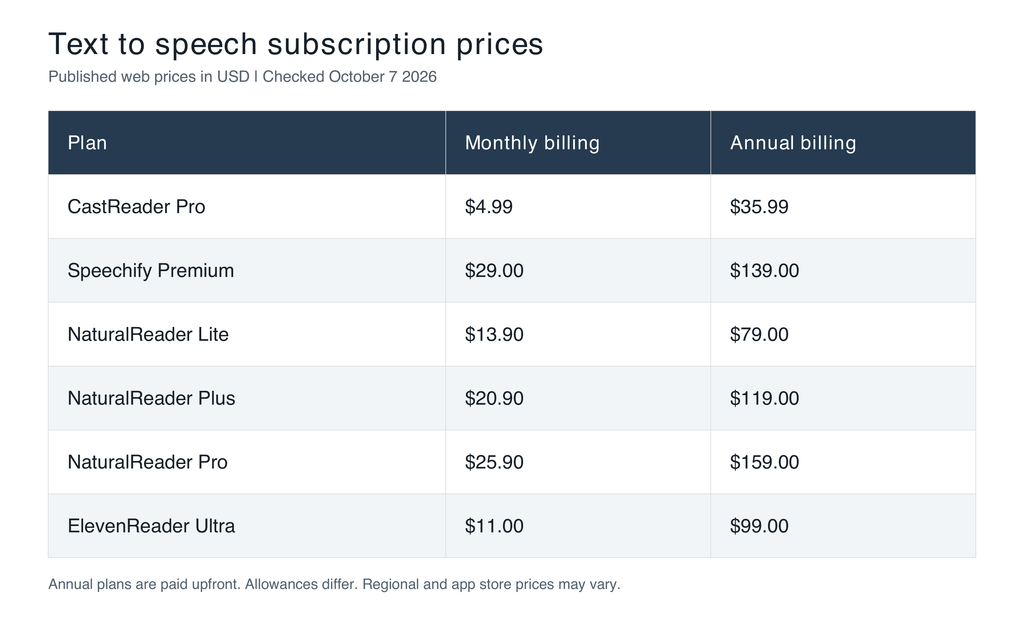
Prices above are in US dollars and were checked on October 7, 2026. Annual subscriptions are billed upfront. Regional and app store prices may differ.
These are reading subscriptions, not book purchases, developer API charges or commercial production licenses. An annual price divided by twelve is not a monthly payment option. Check current checkout terms and allowances, including those in the CastReader Pro plan details, before committing.
Three differences that matter more than feature counts
Original text or AI interpretation. All four products now extend into AI-assisted understanding, but narration, summaries, podcast-style overviews and questions about a document produce different results. A novel usually calls for the author’s words. A report you are screening may call for an overview first. Neither approach is automatically better; the task decides.
What actually works offline. Downloading generated audio, saving text for a device voice and generating cloud speech are separate processes. Speechify Premium, NaturalReader’s MP3 workflow and ElevenReader Ultra offer different offline routes. CastReader’s current iOS release notes describe saving Kindle books in the app for offline reading with system voices. None of this means every voice or AI feature works without a connection, or that every platform has identical support.
Where the content can safely go. Convenience may be the priority for public articles. Client documents, unpublished research and internal reports require a different decision. Check the relevant data handling information and your organization’s rules first. The label text to speech does not tell you whether processing stays on your device.
A useful trial uses your content
Choose a familiar passage with a few real difficulties such as names, abbreviations, numbers and longer sentences. Try the same passage at similar speeds. Listen for intelligibility and check whether highlighting, pausing and returning to a sentence help you stay oriented. A polished demonstration using simple sentences can hide the details that matter in everyday reading.
Then complete a normal task: import a PDF or open an ebook you have permission to read. Inspect headings, footnotes, page changes and paragraph order. If commuting is the goal, test screen lock and offline behavior on your own device. You do not need to exhaust every setting; establish whether your most important task works comfortably.
Choose the tool that helps you keep reading
Start with CastReader if subscription cost and a combination of narration and source-linked visual explanations are priorities. Consider Speechify if you expect to use a broader voice toolkit. Give NaturalReader a close look for document handling, OCR and personal audio files. Try ElevenReader if you prefer collecting content in a dedicated reading app and its voice and offline options fit your routine.
There is no need to name one winner for every reader. Identify the point where reading tends to break down for you, then test the product most likely to help. A lower price matters when the essentials work. More features matter when you actually use them.
