


Supabase is free to start, $25 a month on Pro for most production apps, $599 a month on Team once compliance requirements kick in, and custom priced on Enterprise. None of those numbers are the real story. Usage is. Database size, egress, storage, monthly active users, and compute all meter on top of the base fee, and compute is the one that catches teams off guard the moment they run more than one project.
Supabase Pricing at a Glance: Free, Pro, Team, and Enterprise
| Plan | Price | What’s Included | Best For |
| Free | $0/mo | 500MB database, 50K MAUs, 1GB storage, 2 active projects, auto-pauses after 7 days idle | Hobby projects, prototypes, learning |
| Pro | $25/mo per org + usage | 8GB database, 100K MAUs, 100GB storage, 500 realtime connections, $10/mo compute credit | Most production apps |
| Team | $599/mo per org + usage | Pro’s limits plus SOC 2 Type II / ISO 27001, SSO/SAML, 14-day backups; HIPAA add-on available | Regulated industries, B2B SaaS needing compliance |
| Enterprise | Custom | Dedicated support, BYO cloud, custom SLAs, private networking, custom data residency | Internet-scale workloads |
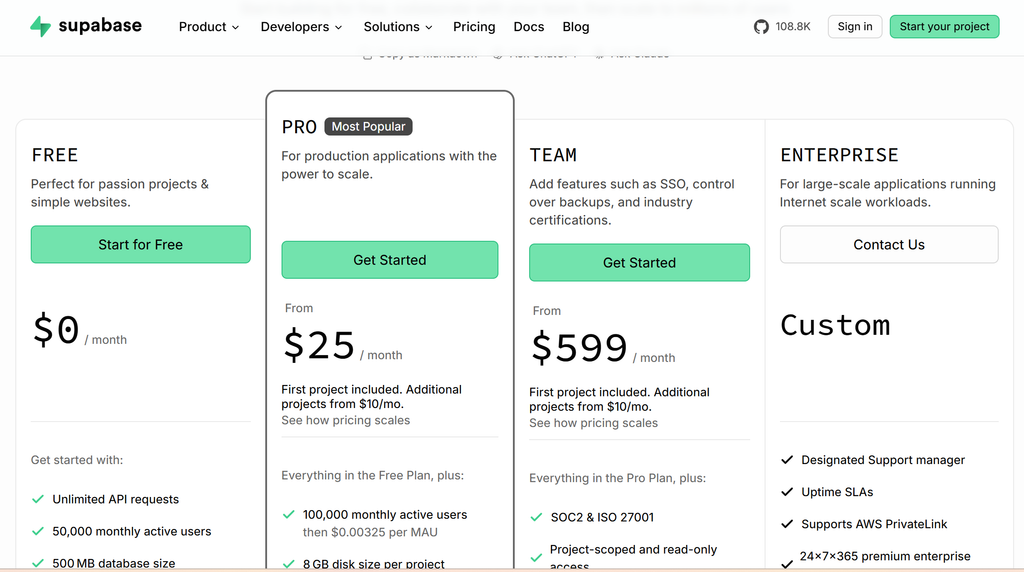
Supabase Free Tier Limits and What Each Plan Includes
Free covers two active projects with a 500MB Postgres database, 50,000 monthly active users for auth, and 1GB of file storage. That’s enough for prototyping, but projects auto-pause after 7 days of inactivity, which rules it out for anything that needs to stay live.
Pro is the default for production apps: an 8GB database, 100,000 MAUs, 100GB of storage, and 500 concurrent realtime connections, plus a $10 monthly compute credit that covers exactly one Micro instance. Cross any of those limits (a bigger database, more MAUs, extra storage, a larger compute size, or a second running project) and it bills as an overage on top of the flat $25 fee.
Team keeps Pro’s resource limits but adds what compliance-driven customers actually need: SOC 2 Type II and ISO 27001 attestations, SSO and SAML, and 14-day log retention with point-in-time recovery. A HIPAA add-on is available on Team for healthcare use cases, though it requires a signed BAA and isn’t included by default.
Enterprise is negotiated directly with Supabase’s sales team. It covers dedicated support engineers, bring-your-own-cloud deployment, custom SLAs, private networking, and custom data residency guarantees, aimed at internet-scale or heavily regulated workloads rather than typical startups.
Also read: Best AI App Builders: 8 Tools Compared (Free and Paid)
Where the Overages Hit: Compute, Storage, and Egress
The usage-based side of Supabase’s pricing is where most of the real cost lives once an app is in production:
- Compute: Paid plans include a $10 monthly credit that covers one Micro instance. Every additional project, or a larger compute size, is billed on top; published rates span roughly $12 to $3,730 a month depending on instance size.
- Database size: Overages apply once a project exceeds its plan’s included allowance (8GB on Pro).
- Bandwidth/egress: Pro includes an allowance before a per-GB overage, reported at roughly $0.09/GB, kicks in.
- Storage: Overages apply past the included 100GB on Pro.
- Monthly active users: Overages apply past the included 100,000 MAUs on Pro.
- HIPAA compliance: Requires Enterprise, or Team plus the specific paid HIPAA add-on and a signed BAA. Free and Pro don’t meet HIPAA requirements on their own, and self-hosting doesn’t either without the managed platform’s compliance infrastructure.
The Cheapest Way to Actually Use Supabase
The Free tier is the cheapest way to evaluate Supabase, but the 2-project cap and 7-day auto-pause on inactivity rule it out for anything beyond a prototype or a learning project. For a real, always-on app, even a small one, Pro is effectively the entry point.
Which Plan Gives You the Best Value
Pro is the plan most teams should budget around. Documented cost breakdowns put typical small-to-medium production apps at $35 to $75 a month once usage fees are included, and high-traffic apps with 200,000-plus MAUs commonly land around $100 to $200 a month. The number to watch is project count. Since the $10 compute credit only covers one Micro instance, running production, staging, and any replica projects as separate Supabase projects means paying full compute on each one beyond the first.
What Real Supabase Bills Look Like
The recurring theme across independent cost breakdowns and case studies is that teams underbudget for per-project compute and egress once an app scales. One documented example: a team running four Pro projects (production, staging, and two regional replicas) budgeted $25 a month based on the plan’s list price, but landed near $130 once compute on the three instances beyond the included Micro credit was added in. That pattern shows up often enough in independent write-ups that it’s worth planning for rather than treating as an edge case. A realistic budget should account for compute per project, not just the flat organization fee.
Supabase vs. Firebase Pricing
Supabase is frequently positioned as an open-source alternative to Firebase, and its pricing reflects that framing: a usage-based model built around a managed Postgres database rather than Firebase’s NoSQL, document-based pricing. Unlike Firebase, Supabase’s core platform is also fully open source, so self-hosting is available at no licensing cost for teams willing to run their own infrastructure, though self-hosting doesn’t carry the managed platform’s compliance certifications.
Before You Commit
- Monthly billing is the default across Free, Pro, and Team. Annual discounts aren’t widely advertised on the self-serve pricing page as of mid-2026, though Enterprise contracts can negotiate annual or volume terms.
- Compute, egress, and storage overage rates change periodically. The figures here reflect Supabase’s published pricing and documentation as of August 2026.
HIPAA and other compliance requirements should be confirmed directly with Supabase’s sales team before committing, since add-on availability and terms can vary by contract.
How much does Supabase cost per month?
Free is $0/month, Pro is $25/month per organization plus usage overages, and Team is $599/month per organization plus usage. Enterprise pricing is custom and negotiated directly with Supabase.
Is Supabase really free?
The Free plan is genuinely free with no credit card required, but it’s capped at 2 active projects and auto-pauses after 7 days of inactivity, which makes it suitable for prototypes and learning rather than a production app.
Does Supabase charge per project or per organization?
The base subscription fee (Pro at $25/month, Team at $599/month) is billed per organization. Compute, however, is billed per project. The included $10 monthly credit covers exactly one Micro instance, so running multiple projects under one organization adds compute cost for each additional project.
Is Supabase HIPAA compliant?
Not by default. HIPAA compliance requires an Enterprise plan, or a Team plan plus a specific paid HIPAA add-on and a signed BAA. Free and Pro don’t meet HIPAA requirements on their own, and self-hosting doesn’t either without the managed platform’s compliance infrastructure.
What happens when I exceed Supabase's free tier limits?
Supabase prompts an upgrade to Pro once usage consistently exceeds Free tier quotas. Projects that sit inactive for 7 days on the Free plan are automatically paused rather than billed.
Pricing reflects Supabase’s published plans and documentation as of October 2026. Compute, egress, and overage rates change periodically; confirm current numbers on supabase.com/pricing before budgeting.
